

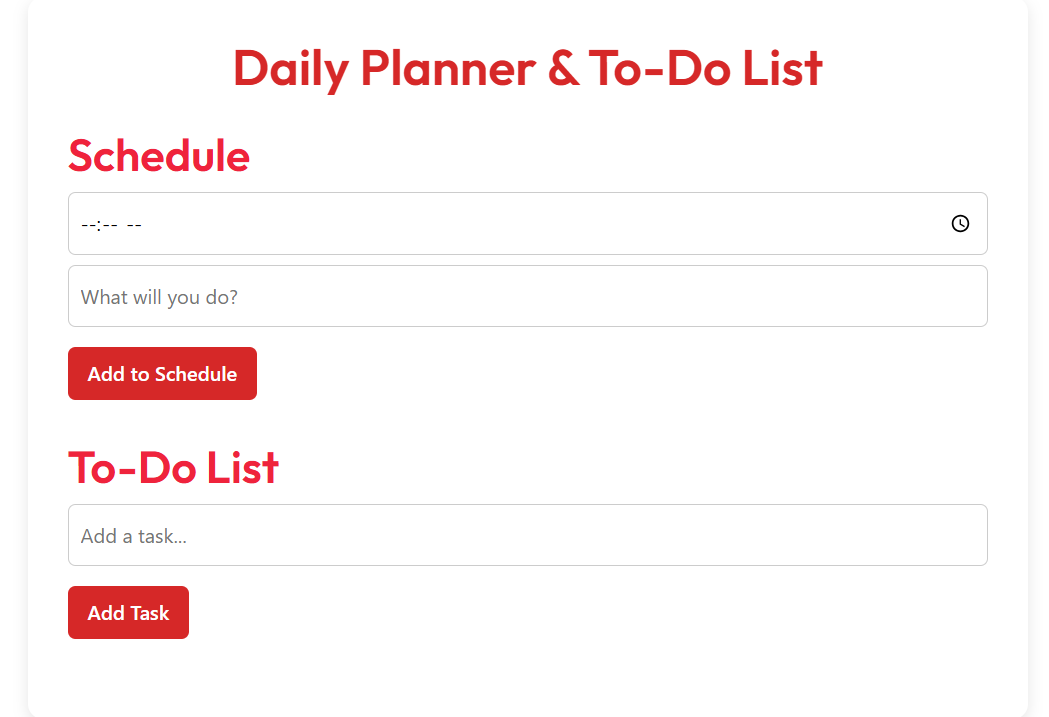
Daily Planner & To-Do List
📤 Share the Daily Planner & To-Do List tool:
Daily Planner & To-Do List: Your Free Digital Task Manager
Staying organized doesn’t have to be hard. With the Daily Planner & To-Do List, you can plan your day, track tasks, and stay focused—without stress. This free, easy-to-use tool helps students, professionals, and busy parents manage their time better and get more done.
No downloads. No sign-up. Just open and start planning. Whether you're preparing for a big project, managing household chores, or studying for exams, this planner keeps everything in one place. It works on phones, tablets, and computers—so you can stay on track wherever you are.
Why Use a Daily Planner & To-Do List?
Every day brings new tasks and distractions. Without a clear plan, it’s easy to forget important things or waste time on low-priority work. A daily planner helps you start each day with purpose.
Research shows that writing down tasks improves memory and focus. When you see your to-do list, you’re more likely to complete it. This tool turns your goals into action steps, so nothing slips through the cracks.
Top Benefits of This Daily Planner
- Simple and fast: Add tasks in seconds with a clean, clutter-free interface.
- Auto-saves your progress: Your list is saved in your browser—no login needed.
- Works offline: Use it anytime, even without internet.
- Mobile-friendly design: Looks great on any screen size.
- Export or print: Save your daily plan as PDF or CSV for sharing or printing.
- Color-coded priorities: Mark urgent tasks so you know what to do first.
Real-World Use Cases
1. College Student Managing Assignments
Mark is a university student juggling classes, part-time work, and group projects. He uses the Daily Planner each morning to list his top 5 tasks—like “Finish history paper” or “Study for chemistry quiz.” By checking off completed items, he stays motivated and avoids last-minute panic. At night, he reviews what he accomplished and plans the next day.
2. Working Parent Balancing Home and Career
Linda works full-time and takes care of two kids. Her days are packed with meetings, school pickups, and housework. She opens the planner every evening to prepare for tomorrow. She adds tasks like “Pack lunches,” “Reply to work emails,” and “Call dentist.” The simple layout helps her stay calm and in control, even on busy days.
3. Freelancer Tracking Client Projects
Raj is a freelance graphic designer with multiple clients. He uses the planner to break big projects into small steps. For example, “Design logo draft,” “Send feedback request,” and “Revise based on notes.” The tool helps him meet deadlines and communicate progress clearly to clients.
How It Stacks Up Against Other Tools
There are many planners and to-do apps, but most require accounts, subscriptions, or complicated setups. This tool is built for simplicity and privacy. Here’s how it compares:
| Feature | Our Daily Planner | Other Popular Tools |
|---|---|---|
| No Account Required | Yes | No (requires email/sign-up) |
| Works Offline | Yes (saves locally) | No (cloud-dependent) |
| Completely Free | Yes | No (premium features locked) |
| Export to PDF/CSV | Yes | Limited or paid only |
| No Ads or Tracking | Yes | No (data collected) |
This planner is faster, more private, and easier to use than most alternatives. You stay in control of your time—and your data.
Frequently Asked Questions (FAQ)
Is the Daily Planner really free?
Yes! There are no fees, no ads, and no premium upgrades. You can use all features for free, forever.
Do I need to sign up or log in?
No. The tool works instantly in your browser. Your tasks are saved on your device using local storage—no email or password needed.
Can I use it on my phone or tablet?
Absolutely. The planner is fully responsive and works smoothly on all devices—iOS, Android, tablets, and desktops.
How do I save my to-do list?
Your tasks are saved automatically as you add them. Just keep using the same browser and device. If you clear your browser data, your list will be deleted.
Can I print my daily plan?
Yes! Use the “Export PDF” option to download a clean, printable version. You can also export to CSV for use in Excel or Google Sheets.
How do I delete a task or clear my list?
To remove a single task, look for the delete (X) button next to it. To clear all tasks, use the “Clear All” option. This resets your list in the current browser.
Start Planning Your Day Today
Success starts with a plan. The Daily Planner & To-Do List helps you take control of your time, reduce stress, and get more done each day. Whether you're a student, professional, or busy parent, this tool makes organization simple.
Instead of reacting to your day, start leading it. Set your goals each morning. Track your progress. Celebrate small wins. Over time, these habits build confidence and productivity.
👉 Open the Daily Planner NowIf you find this tool helpful, please share it with a friend, coworker, or family member. Bookmark this page so you can return anytime. A little planning today leads to big results tomorrow.
Remember: You don’t have to be perfect—just consistent. Use this planner daily, and watch your focus, time management, and peace of mind grow.
Other Ai Tools For Students
(Pomodoro Timer)


